How to block Instagram on iPhone without deleting it
Short answer
How do I block Instagram on my iPhone?
Close the app and instagram.com together. Hiding the app or locking it with Face ID keeps other people out, and it still opens for you. With iOS alone, give Instagram an App Limit, set a Screen Time passcode, and add instagram.com to the Never Allow list under Web Content.
With Firmlock, pick the Instagram app and tap the Instagram chip. That closes instagram.com and cdninstagram.com in every browser (Firmlock 1.0.2 and later), at the hours you choose.
Firmlock: Strict App Blocker is the author's app. It needs Firmlock Pro. Yearly: $29.99 after a 14-day free trial. Monthly: $4.99. Lifetime: $79.99 once. iOS 26.4 or later; not in the EU yet.

What hiding or locking Instagram does
Since iOS 18 you can touch and hold the Instagram icon and tap Require Face ID, or hide the app in a Hidden folder in App Library (Apple iPhone User Guide (iOS 26): Lock or hide an app). Both keep other people out. Instagram still opens with your Face ID, at any hour.
Block Instagram with Screen Time (iOS 26)
- Open Settings › Screen Time › App Limits and tap Add Limit. Find Instagram under Social, tap Next and set the time.
- Set a Screen Time passcode (Settings › Screen Time › Lock Screen Time Settings). Without one, the limit screen offers Ignore Limit.
- For the website, go to Content & Privacy Restrictions › App Store, Media, Web & Games › Web Content › Limit Adult Websites, and add
instagram.comunder Never Allow.
Sources: Apple iPhone User Guide (iOS 26): Set schedules with Screen Time and Apple iPhone User Guide (iOS 26): Block apps, app downloads, websites, and purchases.
On iOS 27, Apple renamed these menus: Downtime became Screen Time Schedule and App Limits became Time Allowances (Apple, iOS 27). The steps above are from the iOS 26 guide.
Where these steps leak
- instagram.com has the same feed, Reels and messages as the app. An App Limit on the app doesn't reach it.
- Instagram links shared in Messages or WhatsApp open in a browser, where the App Limit doesn't apply.
- The Never Allow list has no hours. If you want Instagram in the evening, you have to take the site off the list and put it back.
- If you chose the passcode, you can type it. The Ignore Limit guide shows how to have a friend hold it.
Block Instagram with Firmlock
- Tap Change apps and websites, search for Instagram in Apple's picker and select the app. You can pick the whole Social category instead.
- Under Close their websites too, tap Instagram. That adds instagram.com and cdninstagram.com, where its photos and videos load from.
- Choose when: Start now for 15 minutes to 24 hours, a schedule such as Work hours (9 to 5, Monday to Friday), or a daily limit of 5 minutes to 12 hours.
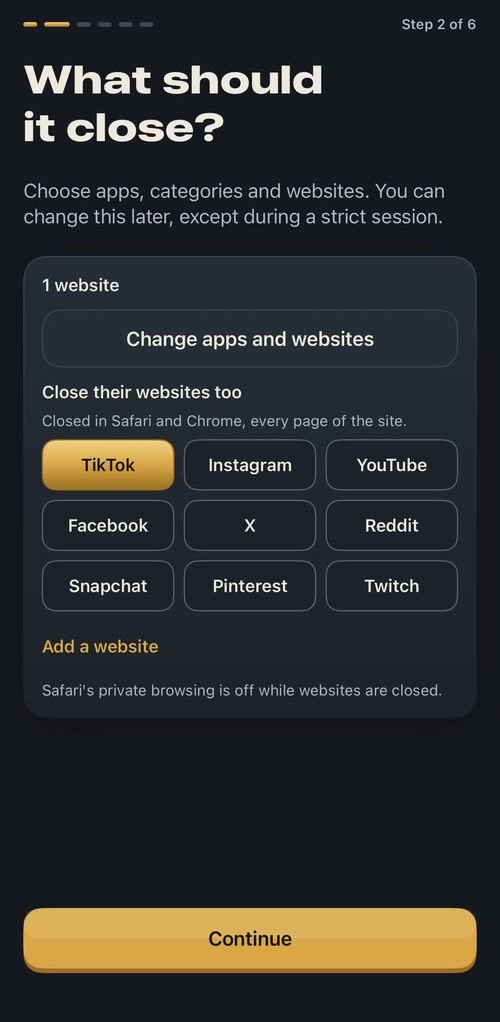
Here TikTok is picked. Tap Instagram the same way. 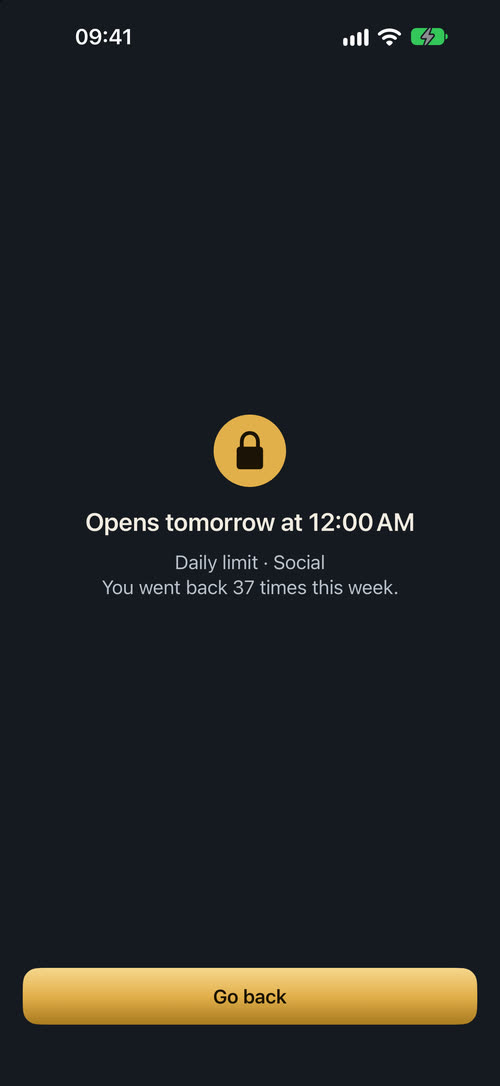
A daily limit on Social: closed until midnight. 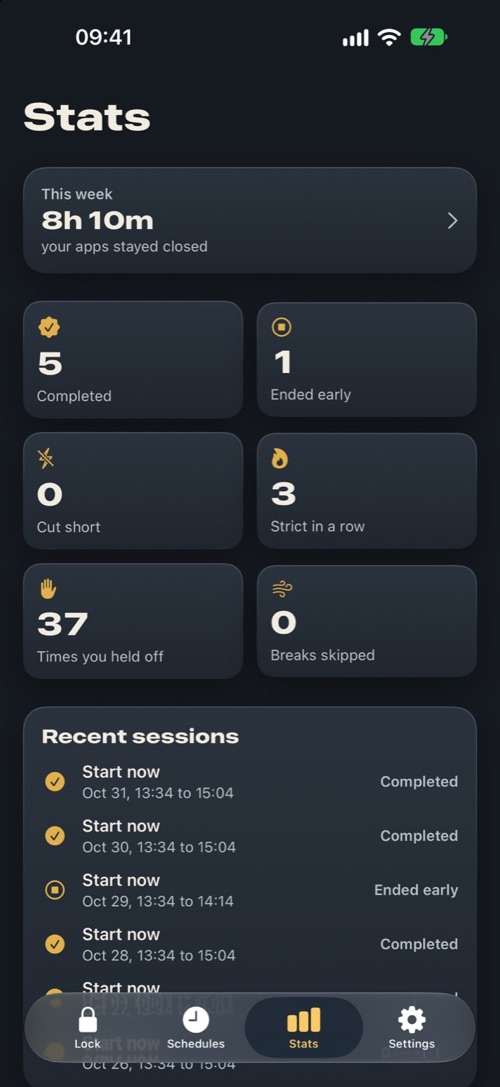
Stats count the times you held off.
While it's closed, Instagram shows Firmlock's shield with the time it opens. The shield counts each time you go back from it, and the week's count is on the shield and in Stats. Firmlock 1.0.2 and later put the websites into Apple's system web filter, which runs inside WebKit, the engine every browser uses on iPhone outside the EU. We tested it on an iPhone with tiktok.com, not instagram.com: tiktok.com closed in Chrome, in Safari and in WhatsApp's in-app browser on November 7, 2026, and in Chrome's incognito tab and Instagram's in-app browser on November 9. A strict session has no End button and no app can be deleted until it ends.
Questions
Can I block only Instagram Reels?
Not with Screen Time or Firmlock. Both close the whole Instagram app and the whole site. If you still want messages, give Instagram a short daily limit instead of closing it all day.
Will blocking Instagram stop my messages?
Yes. Firmlock covers the whole app, messages included, and instagram.com has messages too. They arrive again when the session ends.
Can I block Instagram without deleting it?
Yes. Screen Time and Firmlock both leave the app installed with your account and drafts.
How do I block Instagram at certain times?
On iOS 26, Downtime closes most apps at set hours, but you list what stays open. Firmlock's schedules close only the apps and sites you pick, on the days and hours you set, even while Firmlock is closed.
Does Firmlock see my Instagram account?
No. Firmlock uses Apple's Screen Time. It never sees your account, your feed or your messages, and it has no server.