How to block a website on iPhone in every browser, Chrome included
Short answer
How do I block a website on my iPhone?
iOS has a block list built in: Settings › Screen Time › Content & Privacy Restrictions › App Store, Media, Web & Games › Web Content › Limit Adult Websites, then Add Website under Never Allow. That list is Apple's system web filter, and it stays on around the clock.
To close a site only at certain hours, or so that you can't undo it in a weak moment, Firmlock 1.0.2 and later put the site into the same system filter for a session or a schedule. In our tests on an iPhone, tiktok.com closed in Chrome, in Safari and in WhatsApp's in-app browser on November 7, 2026, and in Chrome's incognito tab and Instagram's in-app browser on November 9.
Firmlock: Strict App Blocker is the author's app. It needs Firmlock Pro. Yearly: $29.99 after a 14-day free trial. Monthly: $4.99. Lifetime: $79.99 once. iOS 26.4 or later; not in the EU yet.

Block a website with Screen Time (iOS 26)
- Open Settings and tap Screen Time.
- Tap Content & Privacy Restrictions and turn it on.
- Tap App Store, Media, Web & Games, then Web Content.
- Choose Limit Adult Websites. Under Never Allow, tap Add Website and type the address, for example
reddit.com.
Source: Apple iPhone User Guide (iOS 26): Block apps, app downloads, websites, and purchases. To stop yourself from deleting the entry, set a Screen Time passcode first (Settings › Screen Time › Lock Screen Time Settings). Apple's iOS 27 guide for your own iPhone no longer describes this list, so the menus may look different there.
Where the Screen Time list falls short
- It has no hours. A site you only want gone at night is gone at lunch too.
- Limit Adult Websites also filters adult content across the web, and Safari's Private Browsing turns off while it's on.
- If you chose the passcode yourself, taking a site off the list takes the passcode you already know.
- A time limit on a website (App Limits › Websites) uses a different path: Apple's shield in Safari, and in Chrome only when Chrome's own Screen Time support is switched on. Firmlock 1.0.1 used that path, and on November 7, 2026 a site closed that way still opened in Chrome on our iPhone. That test is why 1.0.2 switched to the system filter.
Close a website at set hours with Firmlock
- In Firmlock, open Lock or a schedule and tap Change apps and websites. Pick any apps there, and sites under Websites if you like.
- Under Close their websites too, tap a service: TikTok, Instagram, YouTube, Facebook, X, Reddit, Snapchat, Pinterest or Twitch. All of that service's domains close together. For any other site, tap Add a website and type the address.
- Choose when: Start now for 15 minutes to 24 hours, a schedule that repeats on the days you pick, or a daily limit. Turn on Strict if you want no End button.
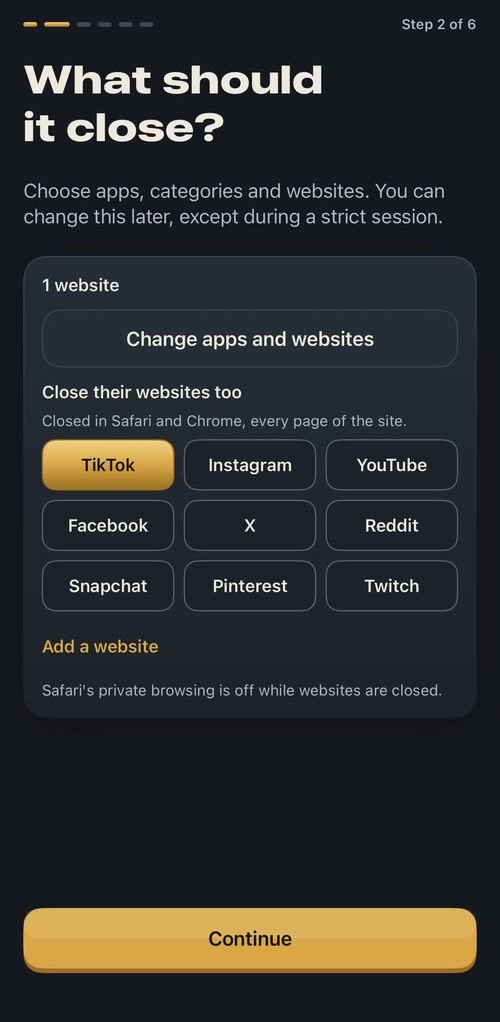
Tap a service and all of its domains close. 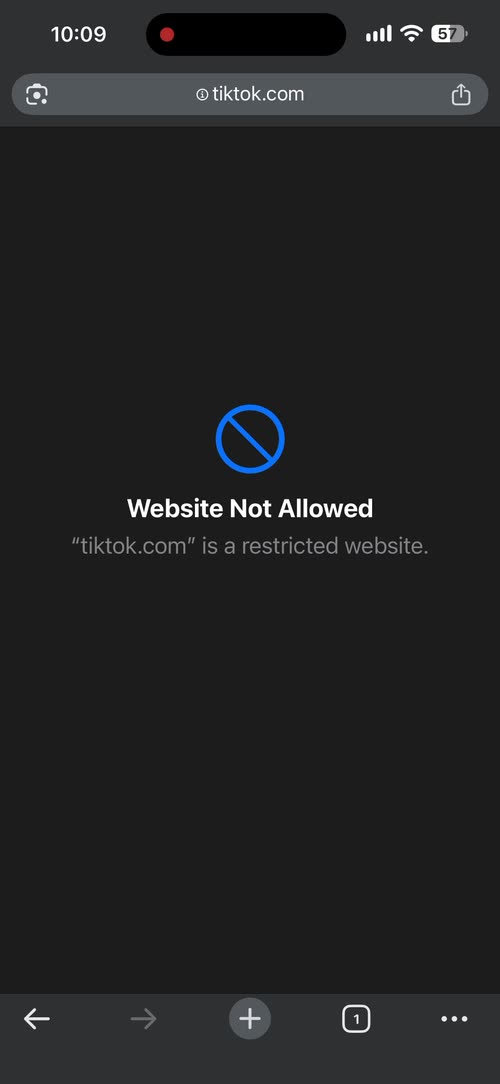
Chrome with Firmlock 1.0.2: Website Not Allowed. 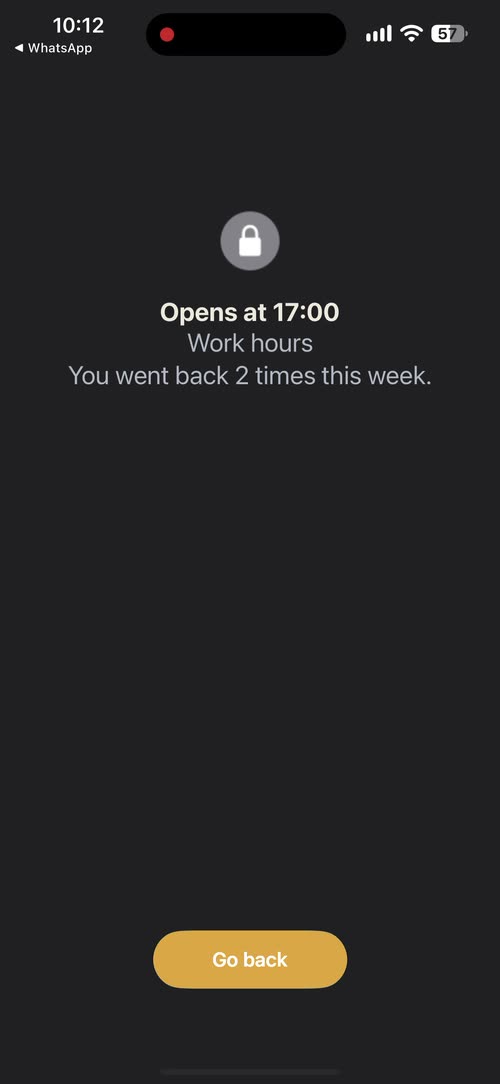
A link from WhatsApp lands on the shield, which counts each time you go back.
Firmlock 1.0.2 writes the sites into Apple's system web filter. On iPhone outside the EU every browser runs on Apple's WebKit engine, and the filter runs inside that engine. In our test with 1.0.2 on November 7, 2026, Chrome showed “Website Not Allowed” for tiktok.com, Safari showed Firmlock's shield, and a TikTok link tapped in WhatsApp opened onto the shield. On November 9, tiktok.com also closed in Chrome's incognito tab and in Instagram's in-app browser. We haven't tested Firefox, Edge or other apps' browsers yet. One list holds up to 50 websites. Safari's Private Browsing is off while websites are closed. In Firmlock 1.0.1, the websites you pick close in Safari, and Chrome depends on Chrome's setting.
Questions
Can I block a website in Chrome on iPhone?
Yes. Chrome on iPhone runs on Apple's WebKit, so Apple's system web filter reaches it. Firmlock 1.0.2 and later put the sites you choose into that filter; in our test on November 7, 2026, tiktok.com showed Website Not Allowed in Chrome.
Can I block a website only at certain hours?
Not with the Screen Time Never Allow list, which is always on. Firmlock closes websites on a schedule you set, such as 9 to 5 on weekdays or 10 p.m. to 7 a.m., and opens them again when it ends.
Does blocking a website also block its app?
No. The app and the website are separate. In Firmlock, pick the app under Change apps and websites, then tap the same service under Close their websites too.
Can I block a website without a VPN?
Yes. Screen Time's list and Firmlock both work without a VPN. Firmlock uses Apple's Screen Time and has no server, so your browsing doesn't pass through anyone.
Does Firmlock see which websites I visit?
No. The addresses you type stay in Firmlock's list on your iPhone, and Apple's filter decides inside the browser. Firmlock gets no browsing history.